

Business Intelligence Dashboards for Saudi Companies: A Plain-Language Guide
Introduction
Most Saudi business leaders make decisions using reports that are days or weeks old.
The finance team spends three days pulling numbers together. The sales manager updates a spreadsheet on Sundays. The CEO reviews last month's data in this month's leadership meeting.
By the time the information reaches the decision, the situation has already changed.
A business intelligence (BI) dashboard solves this directly. It connects to your live data sources and shows you current numbers, updated automatically, without anyone building a report.
This guide explains what BI dashboards are, what they show, how they work with Saudi business systems, what building one actually involves, and how to know if you are ready for one.
What a BI Dashboard Is (and What It Is Not)
A BI dashboard is a screen that shows your most important business metrics in real time. It pulls data from your existing systems (your CRM, accounting software, website, operations platform) and displays it in charts, numbers, and tables.
It updates automatically. No one needs to export a spreadsheet, copy numbers, or format a report.
What it is not:
It is not a replacement for your existing software. Your accounting system still does accounting. The dashboard reads from it.
It is not a reporting tool that someone needs to run manually. It is always on.
It is not only for large businesses. A 10-person Saudi company can benefit from a simple dashboard just as much as an enterprise with 500 staff.
The clearest way to understand it: a BI dashboard is to your business what a car dashboard is to a driver. You do not want to pull over and run a diagnostic every time you need to know your speed. You want the information in front of you, updated continuously, so you can respond in time.
What a BI Dashboard Typically Shows
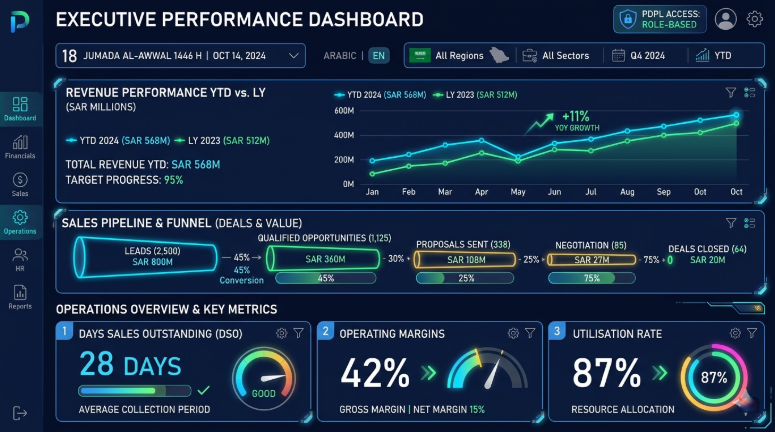
The metrics your dashboard shows should be specific to your business. But there are common categories that most Saudi businesses find useful:
Financial Metrics
Revenue today, this week, this month versus the same period last year
Outstanding invoices and days sales outstanding (DSO)
Expenses versus budget by department
Gross margin by product line or service type
Cash flow forecast for the next 30 and 90 days
Sales and Marketing Metrics
Number of new enquiries by source (website, WhatsApp, referral, social)
Lead-to-customer conversion rate by sales team member
Average deal size and sales cycle length
Pipeline value by stage
Cost per lead by channel
Operations Metrics
Project status across all active projects
Team productivity and utilisation rates
Delivery timelines versus planned timelines
Customer satisfaction scores
Inventory levels if applicable
A well-designed dashboard shows the right metrics for the right people. A leadership dashboard looks different from a sales dashboard or an operations dashboard. Building them together means each audience sees what they need, not a wall of numbers that takes ten minutes to interpret.
How a BI Dashboard Actually Works
Understanding the technical basics helps you ask better questions and make better decisions when building one.
Data Sources
Your dashboard pulls data from the systems your business already uses. Common sources for Saudi businesses include:
Accounting software (QuickBooks, Zoho Books, SAP, Oracle)
CRM systems (Salesforce, HubSpot, Zoho CRM)
Google Analytics or similar website analytics platforms
E-commerce platforms
Spreadsheets (where no dedicated system exists yet)
Custom databases or internal management systems
If your data is in multiple places, the first step is connecting those sources into a single layer. This is the data engineering step, and it is the most technically demanding part of any BI project.
Data Transformation
Raw data from your systems is rarely in a format that a dashboard can display directly. It needs to be cleaned, organised, and structured.
For example, your CRM might store customer names in one format and your accounting system in a slightly different format. Before these two sources can be combined on a single dashboard, that inconsistency needs to be resolved.
This transformation step also applies calculations: revenue minus cost of goods equals gross profit. Leads divided by conversions equals conversion rate. These calculated metrics need to be defined correctly before they appear on the dashboard.
Visualisation Layer
The final layer is the dashboard itself: the charts, numbers, tables, and filters that your team actually looks at.
Good visualisation is not about making things look impressive. It is about making data easy to understand quickly. A bar chart for comparing values, a line chart for trends over time, a single large number for the most critical metric of the day. Clean, clear, fast.
Platforms commonly used for BI dashboards include Microsoft Power BI, Google Looker Studio, Tableau, and Qlik. The right platform depends on your existing Microsoft or Google environment, your team's technical comfort level, and the complexity of your data sources.
Building a BI Dashboard: What the Process Looks Like
A BI project for a Saudi SME typically follows these stages:
Discovery: The technical team meets with your leadership to understand which decisions are most important and what data currently supports (or fails to support) those decisions. This sets the metric priority list.
Data audit: The team reviews the systems you use, the quality of the data they contain, and the connections available between them. Data quality problems are identified here, not mid-build.
Data engineering: Source systems are connected, data is cleaned and structured, and calculated metrics are defined. This is the behind-the-scenes work that determines the quality of everything on top of it.
Dashboard design: Prototype dashboards are built for review. Layout, visualisation type, and metric selection are refined through two or three review rounds with key users.
Testing and launch: The dashboard is tested with live data for accuracy, then released to the appropriate users with access controls in place.
Training and adoption: Users are trained on reading the dashboard, using filters, and interpreting the metrics. A 30-day adoption check-in catches any usability issues before they become habits.
A focused project covering three to five core dashboards typically takes six to ten weeks from discovery to launch.
What Makes a Saudi BI Project Different
Saudi businesses have specific requirements that a generic BI implementation does not automatically address:
Arabic Language Support
Dashboard labels, metric names, and number formatting need to work correctly in Arabic. This includes right-to-left text in chart labels, Arabic numeral formatting preferences in some contexts, and Arabic-language training materials for non-English-speaking staff.
Hijri Calendar
For businesses that report internally using Hijri dates (or that need to present data aligned to Hijri periods for government or regulatory purposes), the dashboard needs to handle date conversion and Hijri-period grouping.
PDPL Compliance
Any dashboard that displays personal data about Saudi residents must comply with the Personal Data Protection Law. This affects access controls (who can see customer-level data versus aggregated data), data retention settings, and audit logging of who viewed which data.
Local Data Sources
Some Saudi businesses use local ERP systems, Arabic-language CRM platforms, or government-connected data systems that international BI implementations have not handled before. A Saudi-based implementation partner will have encountered these integrations and know how to handle them.
Signs Your Business Is Ready for a BI Dashboard
You do not need to be a large enterprise to benefit from a BI dashboard. But there are some conditions that indicate you are ready:
Your team spends more than a few hours per week building reports manually
Leadership meetings regularly start with questions about numbers rather than decisions
You have made at least one significant decision this year based on data you later discovered was wrong or outdated
You have two or more core business systems that do not talk to each other
You are growing fast enough that weekly reporting can no longer keep pace with what is actually happening
If two or more of these apply, a BI dashboard will deliver value quickly. If none apply, your business may be at an earlier stage where basic digitisation is the more relevant investment.
Key Takeaways
A BI dashboard connects to your live data sources and shows current business metrics automatically. No one needs to build or send a report.
The most valuable dashboards are tailored to specific audiences: leadership, sales, operations. A single generic dashboard for everyone is harder to use and less acted on.
Data engineering is the most important and often underestimated part of a BI project. The quality of your dashboard is directly determined by the quality of the data underneath it.
Saudi BI projects need to address Arabic language, Hijri calendar support, PDPL compliance, and local system integrations from the design stage.
A focused BI project covering three to five core dashboards typically takes six to ten weeks and delivers measurable value within the first month of use.
You do not need to be a large business to benefit. Any business with two or more disconnected data sources and regular manual reporting can justify a BI investment.
Frequently Asked Questions
Q: What is the difference between a BI dashboard and a regular analytics report?
A: A report is a document created at a point in time, showing data up to that moment. Someone has to create it, usually manually, and distribute it. A BI dashboard is always live. It shows current data, updates without any manual action, and is available to any authorised user at any time. Reports are snapshots. Dashboards are windows.
Q: How much does a BI dashboard project cost for a Saudi SME?
A: A focused BI project covering three to five dashboards, built on a platform like Power BI or Looker Studio, typically costs between SAR 25,000 and SAR 80,000 for an SME. The range reflects the number of data sources that need to be connected, the complexity of the data engineering work, and the level of customisation required. Platform licensing (Power BI, for example, costs approximately USD 10 per user per month) is an ongoing cost on top of the implementation fee.
Q: Do we need a data warehouse before building a dashboard?
A: Not necessarily for a first project. For simple setups with two or three data sources and modest data volumes, a dashboard can connect directly to those sources. As the number of sources grows, as data volumes increase, or as reporting becomes more complex, a data warehouse becomes valuable. It is better to start with a direct-connection dashboard and add a warehouse layer when the project justifies it, rather than building warehouse infrastructure before any dashboard value has been demonstrated.
Q: Who in our team should own the BI dashboard after it is built?
A: Ownership typically sits with a business analyst, finance manager, or operations manager who understands both the business metrics and has basic technical comfort. This person manages access, requests changes to the dashboard as business needs evolve, and acts as the internal point of contact with the external implementation partner. The dashboard does not need daily technical management, but someone needs to own the relationship with it and with the team that built it.
Q: Can a BI dashboard connect to Arabic-language software used in Saudi Arabia?
A: Yes, if the implementation partner has experience with those systems. Common Saudi business software including some Arabic-language ERP platforms and government-connected systems can be connected to BI tools through database connections, APIs, or flat-file exports. An experienced Saudi implementation partner will have handled these integrations before. An international partner encountering them for the first time will add significant time and cost to the project.
Conclusion
A business intelligence dashboard is one of the most direct investments a Saudi company can make in the quality of its decisions.
The businesses that use them stop losing hours to manual reporting. Their leaders walk into meetings with current information. They catch problems earlier, respond faster, and make resource decisions based on evidence rather than estimates.
The investment is accessible for businesses of almost any size. The technical barrier has dropped significantly as platforms like Power BI and Looker Studio have matured. The main requirement is a clear definition of the decisions you need to make and a partner who knows how to connect your data to make those decisions better.
Softriva has built BI solutions for Saudi businesses across real estate, finance, education, and retail. Our approach starts with your decisions, not with a platform. We connect your existing systems, build dashboards your team actually uses, and provide ongoing support as your needs evolve.
A free BI demo takes 30 minutes and gives you a concrete picture of what is possible with your current data.

Request a Free BI Dashboard Demo at softriva.com


