
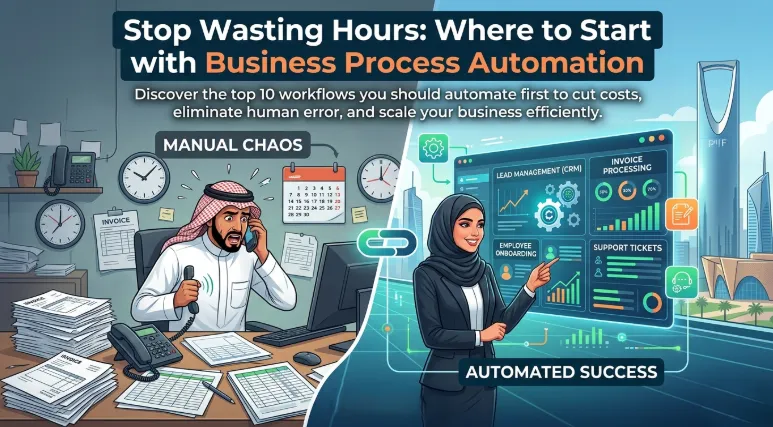
Business Process Automation: Where to Start and What to Automate First
Introduction
Every business depends on processes.
Whether it is managing customer inquiries, processing invoices, approving leave requests, generating reports, onboarding employees, or handling sales leads, organizations rely on workflows to keep operations running smoothly.
However, many of these processes remain highly manual.
Employees spend countless hours entering data, moving information between systems, sending repetitive emails, updating spreadsheets, and completing administrative tasks that add little strategic value.
While these activities are necessary, they often create significant challenges:
Reduced productivity
Higher operational costs
Increased risk of human error
Slower response times
Employee frustration
Limited scalability
As organizations grow, these challenges become even more difficult to manage.
Hiring additional employees can temporarily solve workload issues, but it does not address the underlying inefficiencies.
This is why Business Process Automation (BPA) has become a key component of digital transformation strategies.
Automation enables organizations to streamline repetitive tasks, improve consistency, increase efficiency, and allow employees to focus on higher-value activities.
For businesses in Saudi Arabia pursuing growth, operational excellence, and competitiveness, automation is no longer a luxury—it is becoming a necessity.
This guide explains what business process automation is, why it matters, and which processes organizations should automate first.
What Is Business Process Automation?
Business Process Automation (BPA) refers to the use of technology to automate repetitive, rule-based tasks and workflows.
Instead of relying on manual intervention, software performs specific activities automatically based on predefined conditions and business rules.
Examples include:
Automatically assigning support tickets
Sending approval requests
Updating CRM records
Generating reports
Processing invoices
Scheduling appointments
Automation reduces manual effort while improving speed, consistency, and accuracy.
Why Businesses Are Investing in Automation
Several factors are driving increased automation adoption.
Rising Operational Costs
Manual processes require significant employee time.
As workloads increase, organizations often add resources rather than improving efficiency.
Automation helps control operational costs by reducing repetitive work.
Increasing Customer Expectations
Customers expect:
Faster responses
Immediate service
Consistent experiences
Manual workflows often struggle to meet these expectations.
Automation improves responsiveness and service quality.
Workforce Productivity
Employees deliver greater value when focusing on strategic work rather than repetitive administrative tasks.
Automation allows teams to spend more time on innovation, customer engagement, and problem-solving.
Business Growth
Growing organizations must scale operations efficiently.
Automation enables businesses to handle increased workloads without proportional increases in staffing requirements.
The Benefits of Business Process Automation
Increased Efficiency
Automated workflows execute tasks instantly and consistently.
Processes that previously required hours may be completed in minutes or seconds.
Reduced Human Error
Manual data entry and repetitive tasks are common sources of mistakes.
Automation improves accuracy and consistency.
Improved Employee Experience
Employees often find repetitive tasks frustrating.
Automation eliminates routine work and allows teams to focus on meaningful activities.
Faster Decision-Making
Automated workflows accelerate information flow across departments.
Approvals, notifications, and updates occur more quickly.
Better Customer Experience
Faster internal processes often translate into better customer service and improved satisfaction.
Greater Scalability
Organizations can manage increasing workloads without significant increases in operational costs.
Characteristics of Good Automation Candidates
Not every process should be automated immediately.
The best automation opportunities typically involve activities that are:
Repetitive
Tasks performed frequently.
Rule-Based
Processes that follow predictable logic.
Time-Consuming
Activities consuming significant employee effort.
Error-Prone
Processes where mistakes frequently occur.
High Volume
Tasks performed at scale across the organization.
What Processes Should You Automate First?
Organizations often ask:
"Where should we begin?"
The answer depends on business priorities, but several areas commonly deliver strong ROI.
Process #1: Lead Management
Many organizations lose opportunities because leads are not handled quickly enough.
Automation can:
Capture leads automatically
Assign leads to sales representatives
Send follow-up emails
Update CRM systems
Trigger nurturing campaigns
Benefits
Faster response times
Improved lead conversion
Better sales efficiency
Process #2: Customer Support Workflows
Customer service teams frequently handle repetitive requests.
Automation can:
Route support tickets
Categorize inquiries
Send acknowledgements
Escalate issues
Benefits
Faster resolution times
Improved customer satisfaction
Reduced support workload
Process #3: Employee Onboarding
Onboarding often involves numerous administrative activities.
Automation can manage:
Document collection
Account creation
Equipment requests
Training assignments
Benefits
Consistent onboarding experiences
Reduced HR workload
Faster employee productivity
Process #4: Invoice Processing
Finance departments often spend significant time processing invoices.
Automation can:
Capture invoice data
Validate information
Route approvals
Update financial systems
Benefits
Faster processing
Reduced errors
Improved compliance
Process #5: Approval Workflows
Approval processes often create bottlenecks.
Examples include:
Purchase requests
Expense approvals
Contract reviews
Leave requests
Automation streamlines approvals through predefined workflows.
Benefits
Faster decisions
Greater visibility
Reduced delays
Process #6: Reporting and Analytics
Many organizations still prepare reports manually.
Automation can:
Collect data
Generate reports
Distribute dashboards
Notify stakeholders
Benefits
Faster access to information
Improved accuracy
Better decision-making
Process #7: Marketing Campaigns
Marketing automation is one of the most common use cases.
Automation can handle:
Email campaigns
Customer segmentation
Lead nurturing
Follow-up communications
Benefits
Increased engagement
Improved conversion rates
Reduced manual effort
Process #8: Appointment Scheduling
Businesses that rely on appointments often face administrative overhead.
Automation can:
Schedule appointments
Send reminders
Manage rescheduling
Update calendars
Benefits
Improved efficiency
Reduced missed appointments
Better customer experiences
Process #9: Data Synchronization
Organizations frequently operate multiple systems.
Employees often transfer information manually between:
CRM platforms
ERP systems
Marketing tools
Support platforms
Automation keeps information synchronized automatically.
Benefits
Improved accuracy
Reduced duplication
Better visibility
Process #10: Document Management
Document-related activities often involve repetitive work.
Automation can:
Route documents
Manage approvals
Archive records
Notify stakeholders
Benefits
Faster workflows
Improved compliance
Better organization
Technologies Supporting Automation
Modern automation solutions leverage various technologies.
Workflow Automation Platforms
These platforms automate business processes without extensive development requirements.
Examples include workflow orchestration tools and low-code automation platforms.
Robotic Process Automation (RPA)
RPA automates repetitive digital tasks performed within applications.
Examples include:
Data entry
Report generation
Form processing
Artificial Intelligence
AI enhances automation by enabling:
Document understanding
Predictive analytics
Intelligent decision-making
Conversational interactions
Integration Platforms
Integration tools connect systems and automate data movement across applications.
Common Automation Mistakes
Organizations should avoid several common pitfalls.
Automating Broken Processes
Automation should improve processes rather than simply accelerating inefficiencies.
Review workflows before automating them.
Trying to Automate Everything
Attempting large-scale automation immediately increases complexity and risk.
Start with targeted opportunities.
Ignoring Employee Input
Employees often understand process challenges better than anyone.
Their involvement improves automation outcomes.
Lack of Governance
Automation initiatives should include:
Standards
Security controls
Ownership
Monitoring
Failing to Measure Results
Organizations should track performance improvements to demonstrate business value.
Building an Automation Strategy
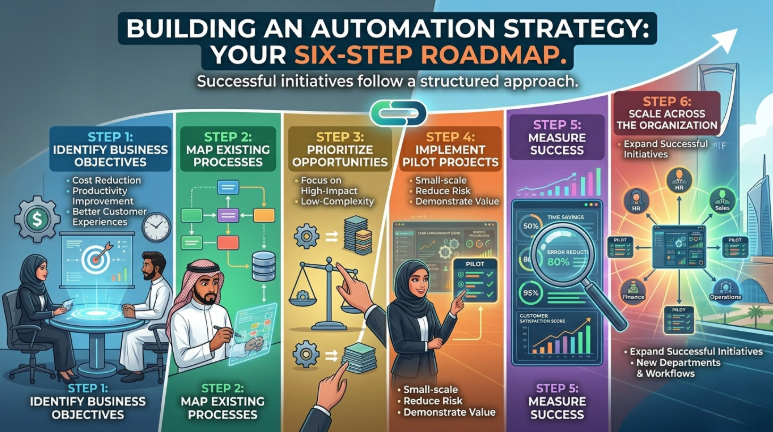
Successful automation initiatives follow a structured approach.
Step 1: Identify Business Objectives
Define goals such as:
Cost reduction
Productivity improvement
Faster service delivery
Better customer experiences
Step 2: Map Existing Processes
Understand current workflows and identify inefficiencies.
Step 3: Prioritize Opportunities
Focus on high-impact, low-complexity processes first.
Step 4: Implement Pilot Projects
Small-scale projects reduce risk while demonstrating value.
Step 5: Measure Success
Track metrics including:
Time savings
Error reduction
Productivity improvements
Customer satisfaction
Step 6: Scale Across the Organization
Expand successful automation initiatives into additional departments and workflows.
The Future of Business Process Automation
Automation capabilities continue to evolve rapidly.
Future trends include:
AI-powered workflows
Intelligent decision automation
Hyperautomation initiatives
Advanced analytics integration
End-to-end process orchestration
Organizations that build automation capabilities today will be better positioned to leverage future innovations.
Automation is increasingly becoming a foundational business capability.
Key Takeaways
✓ Business Process Automation reduces manual effort and improves efficiency.
✓ Automation helps organizations reduce costs, improve accuracy, and enhance customer experiences.
✓ Lead management, customer support, onboarding, reporting, and approvals are excellent starting points.
✓ Successful automation focuses on business outcomes rather than technology alone.
✓ Workflow automation, RPA, AI, and integration platforms support modern automation initiatives.
✓ Organizations should begin with high-impact, low-complexity processes.
✓ Employee involvement improves automation success rates.
✓ Automation enables scalable growth without proportional increases in operational costs.
Frequently Asked Questions
Q: What is Business Process Automation?
A: Business Process Automation uses technology to automate repetitive tasks and workflows, improving efficiency, accuracy, and productivity.
Q: Which processes should businesses automate first?
A: Common starting points include lead management, customer support workflows, invoice processing, approvals, onboarding, and reporting.
Q: What is the difference between automation and RPA?
A: Automation is a broad concept covering workflow improvements, while Robotic Process Automation (RPA) specifically automates repetitive digital tasks performed within software applications.
Q: Is automation only suitable for large organizations?
A: No. Businesses of all sizes can benefit from automation, often achieving significant productivity and efficiency gains.
Q: How do organizations measure automation success?
A: Common metrics include time savings, cost reductions, productivity improvements, error reduction, customer satisfaction, and operational efficiency gains.
Conclusion
Business Process Automation is one of the most practical and impactful ways organizations can improve operational efficiency and support growth.
By eliminating repetitive work, reducing errors, accelerating workflows, and improving visibility, automation creates measurable business value across departments.
The most successful organizations do not attempt to automate everything at once.
Instead, they focus on high-impact opportunities, implement strategically, and expand based on proven results.
For businesses in Saudi Arabia pursuing digital transformation, automation provides a powerful foundation for scalability, agility, and long-term competitiveness.
Softriva helps organizations identify automation opportunities, design efficient workflows, integrate business systems, and implement intelligent automation solutions that deliver measurable outcomes.
Book Your Free Automation Assessment at softriva.com and discover how automation can help your organization work smarter, reduce costs, and accelerate growth.


