ERP and HRMS for Saudi Businesses: How to Choose, What It Costs, and What to Expect
Introduction
Most Saudi businesses reach a point where their spreadsheets stop working.
Invoices are in one file. Payroll is in another. Stock levels are in a third. HR records are in a folder somewhere. None of these connect to each other, so any report that needs numbers from two of them requires someone to spend time pulling data together and hoping they have the most recent version.
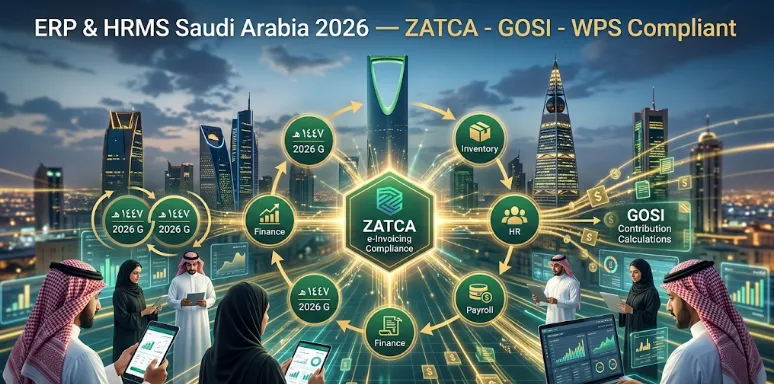
ERP (Enterprise Resource Planning) and HRMS (Human Resource Management Systems) exist to solve this problem. They bring your business operations and your people management into connected, structured systems that give you one version of the truth.
This guide explains what ERP and HRMS are, what they actually do for a Saudi business, the specific Saudi requirements they need to meet, how to evaluate options, and what implementation actually looks like.
What ERP Is and What It Is Not
An ERP is a business software system that connects your core operations: finance, procurement, inventory, sales, and project management. It gives all of these functions access to the same data in real time.
When a sales order is raised in an ERP, it automatically updates inventory, triggers a procurement request if stock is low, generates an invoice in finance, and updates the sales pipeline. No one copies anything. No one emails a spreadsheet. The system handles the flow.
What ERP is not:
It is not magic. An ERP does not fix disorganised processes. It structures them. You need to understand your processes before you implement an ERP or the system will simply codify your existing problems.
It is not only for large companies. Modern cloud ERP systems are designed and priced for SMEs. A business with 15 to 200 employees can benefit significantly from a well-chosen ERP.
It is not a quick fix. ERP implementation requires time, internal effort, and good project management. Businesses that treat it as a technology purchase rather than a process project consistently have poor outcomes.
What HRMS Is and What It Handles
An HRMS is a system specifically designed to manage your people: their records, their contracts, their leave, their payroll, their performance, and their compliance with Saudi employment law.
A well-implemented HRMS handles:
Employee records and document management: Iqama copies, contracts, certifications, and emergency contacts, all stored in one place with expiry date alerts.
Leave management: Annual leave, sick leave, maternity and paternity leave, public holiday calendars including Hijri dates. Requests, approvals, and balances all managed in the system.
Payroll processing: Monthly salary calculations including basic salary, housing allowance, transport allowance, overtime, deductions, and GOSI contributions. Output to bank transfer files.
GOSI compliance: Automated calculation of GOSI employer and employee contributions, generation of required reports.
End of service benefits: Calculation of gratuity in line with Saudi Labour Law, tracked against each employee's tenure and terms.
Performance management: Goal setting, review cycles, rating records.
Recruitment: Job postings, applicant tracking, offer management.
For Saudi businesses managing staff from multiple nationalities, with a mix of Saudi and expatriate employees subject to different rules, an HRMS is not a convenience. It is a compliance tool.
Saudi-Specific Requirements for ERP and HRMS
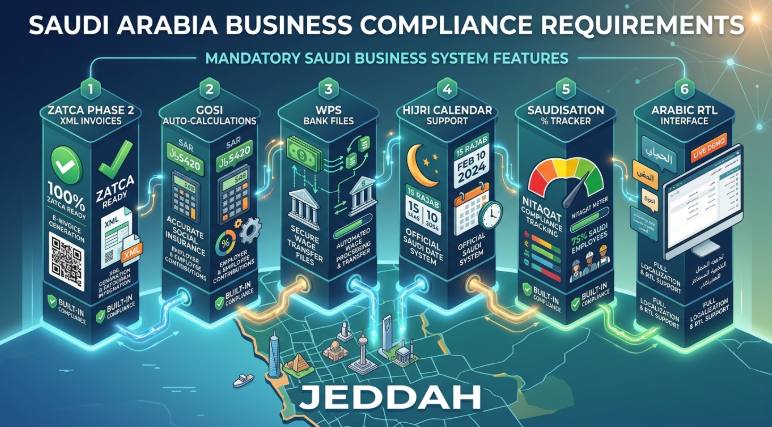
Generic ERP and HRMS systems built for European or US markets require significant customisation for Saudi use. The Saudi-specific requirements that must be built in from the start include:
ZATCA E-Invoicing (Fatoorah) Compliance
All VAT-registered businesses in Saudi Arabia are required to generate invoices through ZATCA-compliant e-invoicing systems. Phase 2 of the Fatoorah mandate requires invoices to be generated in a specific XML format and integrated with the ZATCA platform in near real time.
An ERP that cannot produce ZATCA-compliant invoices is an ERP that puts your business outside the law on every transaction.
Arabic Language Interface
Your staff need to use the system effectively. For teams that include Arabic-speaking employees, a system that only operates in English creates adoption barriers that undermine the entire investment.
Arabic support in an ERP or HRMS needs to go beyond translation. It needs to handle right-to-left text correctly in forms, reports, and printed documents.
Hijri Calendar
Saudi contracts, HR records, government filings, and some financial documents use Hijri dates. Your system needs to store, display, and calculate using Hijri dates where required, and translate correctly between Hijri and Gregorian.
Leave accrual, end of service benefit calculation, and contract anniversary tracking all require correct Hijri date handling.
GOSI Integration
The General Organisation for Social Insurance (GOSI) requires monthly contribution reports and payments for all employees. Your HRMS should calculate GOSI contributions automatically and generate the required reporting format for submission.
Wage Protection System (WPS)
Saudi Arabia's Wage Protection System requires employers to pay salaries through approved channels and submit salary data to the Ministry of Human Resources. Your HRMS payroll module needs to generate WPS-compliant files for bank submission.
Saudisation (Nitaqat) Tracking
Saudi labour regulations require businesses in most sectors to maintain minimum percentages of Saudi national employees (Saudisation or Nitaqat). Your HRMS should track your current Saudisation percentage and alert you when you are approaching compliance thresholds.
How to Choose Between ERP Options
The ERP market includes dozens of options at different price points and capability levels. Here is a practical framework for narrowing your choice:
Define Your Core Use Cases First
Before you look at any software, write down the five most important operational problems you want to solve. For most Saudi SMEs, the top priorities are usually financial reporting and invoicing, inventory or project management, and HR and payroll. Your core use cases tell you which modules matter most and which platforms are worth evaluating.
Check Saudi-Specific Compliance Out of the Box
Ask every vendor directly: does your system produce ZATCA-compliant Phase 2 e-invoices? Does it handle GOSI contribution calculations and reports? Does it generate WPS payroll files? Does it support Hijri dates natively?
If a vendor cannot answer yes to all four of these questions without describing a customisation project, remove them from your list.
Evaluate the Implementation Partner, Not Just the Software
An ERP is implemented by a partner, not by the software vendor. The quality of your implementation partner has more impact on your project outcome than the choice of software.
Look for a partner with Saudi market experience, a track record of ERP implementations in your industry, and the ability to support you in Arabic.
Understand the Total Cost of Ownership
ERP costs are almost always presented as software licence fees. The total cost includes implementation (which often exceeds the first year licence cost), data migration, training, customisation, and ongoing support.
Ask for a total cost estimate covering the first three years, including all of these elements. Compare vendors on total cost, not just the subscription price.
Cloud versus On-Premise
Cloud ERP (software hosted by the vendor and accessed via a browser) has become the standard for most Saudi SMEs. It is lower cost to implement, easier to update, accessible from any location, and does not require your own server infrastructure.
On-premise ERP (installed on your own servers) is appropriate for businesses with strict data residency requirements or very complex customisation needs that cloud platforms cannot accommodate. For most Saudi SMEs, cloud is the right choice.
What ERP Implementation Actually Looks Like
A well-managed ERP implementation for a Saudi SME follows these phases:
Discovery and scoping: The implementation partner maps your current processes, defines which modules are in scope, and produces a detailed project plan with timelines and costs.
Configuration: The system is configured for your business: your chart of accounts, your product catalogue, your employee records, your approval workflows, and your Saudi compliance settings.
Data migration: Your existing data (customer records, supplier details, inventory, employee records, historical transactions) is cleaned and migrated into the new system. This is the most underestimated step in most implementations.
Testing: A defined set of test scenarios is run through the system to verify that it produces the correct outputs for your real-world transactions. Testing should be done by your team, not just by the implementation partner.
Training: Every user of the system is trained on their specific functions. Training should use your own data and your own processes, not generic demonstrations.
Go-live and hypercare: The system goes live and the implementation partner provides intensive support for the first two to four weeks. Most implementation issues surface in this period.
Ongoing support: After hypercare ends, ongoing support for questions, changes, and optimisation is provided. Confirm what this looks like and what it costs before signing the implementation contract.
Key Takeaways
ERP connects your core business operations (finance, inventory, procurement, sales) so that data flows automatically between functions without manual copying.
HRMS manages your people: their records, leave, payroll, GOSI, WPS compliance, Saudisation tracking, and end of service benefits.
Saudi-specific requirements that must be built in from day one include ZATCA Phase 2 e-invoicing, GOSI reporting, WPS files, Hijri calendar support, and Arabic-language interfaces.
The implementation partner matters more than the software choice. Saudi market experience and Arabic-language support are essential partner qualifications.
Total cost of ownership must include implementation, data migration, training, and ongoing support. Software licence fees alone are a misleading comparison basis.
Cloud ERP is the right choice for most Saudi SMEs. It is lower cost to implement, easier to maintain, and accessible from any location.
Frequently Asked Questions
Q: How long does a typical ERP implementation take for a Saudi SME?
A: For a focused implementation covering finance, inventory, and basic HR for an SME with 20 to 100 employees, a realistic timeline is three to six months from contract signing to go-live. Larger scope (multiple locations, complex integrations, significant data migration) extends this to six to twelve months. The most common cause of delays is slow data preparation and slow internal review cycles. Businesses that assign a dedicated internal project owner consistently achieve faster and smoother implementations.
Q: Can an ERP system integrate with our existing software?
A: Most modern cloud ERP systems offer API-based integration with common business tools: e-commerce platforms, CRM systems, banking platforms, and government portals including ZATCA. The feasibility of a specific integration depends on whether the external system has an API and whether the ERP vendor or implementation partner has built that integration before. Ask for a specific integration list from your vendor, not just a general claim of 'open API'.
Q: Is our data safe in a cloud ERP system?
A: Cloud ERP data security depends on the vendor's security practices and the data centre location. For Saudi businesses with PDPL obligations, verify that the vendor can confirm where your data is stored and that it meets PDPL cross-border transfer requirements. Reputable cloud ERP vendors (SAP, Oracle, Microsoft Dynamics, Odoo) maintain high security standards and offer data residency options including Gulf-region data centres. Get this confirmation in writing before signing.
Q: What is the difference between an ERP and accounting software?
A: Accounting software (QuickBooks, Zoho Books, Wave) handles financial transactions: invoicing, expense tracking, bank reconciliation, and financial reporting. An ERP includes accounting functionality but connects it to your operational processes: inventory, procurement, sales orders, project management, and HR. Accounting software is the right tool for a business whose main requirement is financial records. An ERP is the right tool for a business that needs its financial data connected to its operational reality.
Q: What happens to our data if we want to switch ERP systems later?
A: Data portability should be confirmed before you sign any ERP contract. You should be able to export your data in standard formats (CSV, Excel, XML) at any time. Some vendors make this straightforward. Others build friction into the process. Ask specifically how data export works, what formats are available, and whether there is a cost. If the vendor cannot give you a clear answer, treat it as a warning about what the relationship will look like when you want to leave.
Conclusion
ERP and HRMS are not optional for a Saudi business of any size that wants to grow without growing its administrative overhead at the same rate.
The Saudi compliance requirements alone (ZATCA, GOSI, WPS, PDPL, Saudisation) are difficult to manage reliably in spreadsheets. Adding the operational complexity of inventory, procurement, and multi-department finance makes the case for structured systems even clearer.
The businesses that implement ERP and HRMS well share a common approach: they define their process problems before looking at software, they choose partners with Saudi market experience, they invest in proper data migration and training, and they treat go-live as the beginning of the project rather than the end.
Softriva has been implementing business software for Saudi companies since 2006. Our team has hands-on experience with Saudi compliance requirements across ZATCA, GOSI, PDPL, and the labour law, and we implement and support systems in both Arabic and English.
A free consultation gives you a realistic assessment of what an ERP or HRMS implementation would involve for your specific business size, industry, and current systems.
Book a Free ERP and HRMS Consultation at softriva.com


