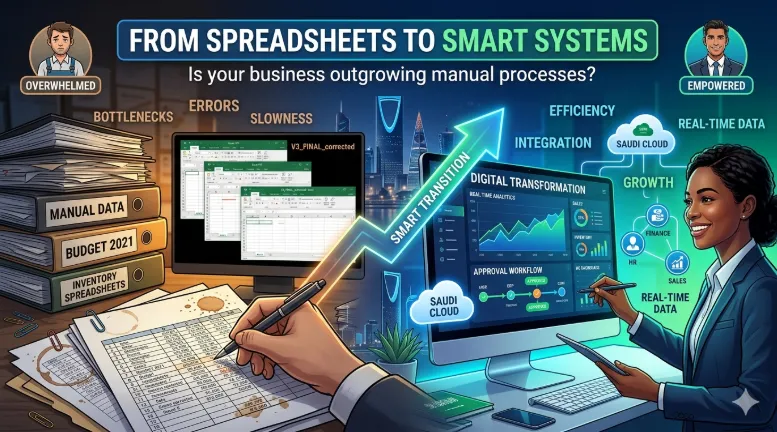
From Spreadsheets to Smart Systems: Signs Your Business Has Outgrown Manual Processes
Introduction
Almost every successful business starts with spreadsheets.
In the early stages of growth, spreadsheets are flexible, affordable, and familiar. They help organizations track finances, manage inventory, monitor sales, maintain employee records, and organize operational information without significant technology investments.
For small teams with simple operations, spreadsheets can be highly effective.
The problem arises when businesses continue relying on spreadsheets long after they have outgrown them.
What once served as a practical solution gradually becomes an operational bottleneck.
Employees spend hours updating data manually.
Managers struggle to determine which version of a spreadsheet is correct.
Reports take days to compile.
Critical information becomes scattered across multiple files and departments.
Errors become increasingly common.
Growth slows because the underlying systems cannot support increasing complexity.
This transition often happens gradually, making it difficult for leadership teams to recognize when spreadsheets have become a liability rather than an asset.
For businesses across Saudi Arabia pursuing growth, operational efficiency, and digital transformation, recognizing these warning signs is essential.
This guide explains how to identify when your organization has outgrown manual processes and what steps can be taken to transition toward smarter, scalable business systems.
Why Spreadsheets Become a Problem as Businesses Grow
Spreadsheets are designed for data organization and analysis.
They are not designed to function as enterprise business systems.
As organizations expand, several challenges emerge.
Increased Data Volume
More customers.
More employees.
More transactions.
More products.
More suppliers.
As data volumes increase, spreadsheets become slower, harder to maintain, and more vulnerable to errors.
More Users
A spreadsheet used by one employee is manageable.
A spreadsheet accessed by multiple departments quickly becomes difficult to control.
Version conflicts become common.
Changes may be overwritten or lost entirely.
More Complexity
Business growth introduces:
Approval workflows
Compliance requirements
Customer service processes
Procurement activities
Reporting obligations
These activities require structured systems rather than isolated spreadsheets.
Sign #1: Employees Spend More Time Updating Data Than Using It
One of the clearest warning signs is excessive administrative effort.
Employees manually:
Copy information between files
Update records
Reconcile discrepancies
Generate reports
Verify data accuracy
Instead of using information to make decisions, teams spend significant time maintaining information.
This creates hidden operational costs that often go unnoticed.
The Business Impact
When highly skilled employees spend hours managing spreadsheets, productivity suffers.
Resources that could support growth are consumed by administration.
Sign #2: Multiple Versions of the Same Spreadsheet Exist
Many businesses experience the following scenario:
A manager asks for a report.
Several departments provide different versions of the same spreadsheet.
Each version contains different numbers.
Nobody knows which version is correct.
This issue becomes increasingly common as organizations grow.
The Business Impact
Conflicting information creates:
Delayed decisions
Reduced confidence in data
Increased verification effort
Operational confusion
Reliable decision-making requires a single source of truth.
Sign #3: Reporting Takes Too Long
Manual reporting is often one of the first areas where scalability problems appear.
Employees gather information from:
Sales systems
Accounting records
Operational spreadsheets
Inventory reports
Customer databases
The process may take days.
By the time reports are completed, the information may already be outdated.
The Business Impact
Slow reporting limits agility.
Leadership cannot respond quickly to changing conditions when information arrives too late.
Sign #4: Errors Are Becoming More Common
Manual data entry inevitably introduces mistakes.
Examples include:
Duplicate records
Incorrect calculations
Missing information
Formula errors
Accidental deletions
As data volumes increase, error rates typically increase as well.
The Business Impact
Errors affect:
Financial reporting
Customer service
Inventory management
Compliance activities
Strategic decision-making
Even small inaccuracies can create significant downstream consequences.
Sign #5: Business Processes Depend on Specific Individuals
Many organizations unknowingly create operational dependencies.
A particular employee understands:
Which spreadsheets to use
Which formulas matter
Which reports are accurate
Which manual workarounds are required
If that individual leaves, critical knowledge leaves with them.
The Business Impact
Operational resilience decreases.
Knowledge becomes trapped within individuals rather than embedded within systems.
Sign #6: Approvals Are Managed Through Email
Email-based approvals may seem manageable initially.
However, as businesses grow, approval chains become increasingly difficult to track.
Questions arise such as:
Who approved this request?
When was approval granted?
What supporting documentation exists?
Searching through email threads is inefficient and unreliable.
The Business Impact
Approval delays slow operations and reduce accountability.
Sign #7: Departments Operate in Silos
Many spreadsheet-driven organizations maintain separate records for:
Finance
HR
Sales
Operations
Procurement
Each department manages its own data.
Information sharing becomes difficult.
Consistency becomes challenging.
The Business Impact
Disconnected information leads to:
Duplicate effort
Inconsistent reporting
Poor visibility
Slower decision-making
Modern organizations require integrated information environments.
Sign #8: Customer Experience Is Being Affected
Operational inefficiencies often become visible to customers.
Examples include:
Delayed responses
Incorrect information
Slow service delivery
Missed follow-ups
Customers may never see the spreadsheets causing these issues, but they experience the consequences.
The Business Impact
Customer satisfaction declines.
Retention becomes more difficult.
Competitive positioning weakens.
Sign #9: Compliance and Audit Preparation Are Painful
Regulatory requirements continue to increase across industries.
Manual recordkeeping often creates challenges during:
Audits
Compliance reviews
Regulatory reporting
Documentation may be incomplete or difficult to locate.
The Business Impact
Compliance risks increase while preparation efforts consume valuable resources.
Sign #10: Growth Feels More Difficult Than It Should
Perhaps the most important indicator is a general sense that operations are becoming increasingly difficult.
Every new employee creates additional administration.
Every new customer increases complexity.
Every new product requires more manual effort.
Growth becomes harder instead of easier.
The Business Impact
Scalability suffers.
Organizations reach a point where manual processes limit future expansion.
What Are Smart Business Systems?
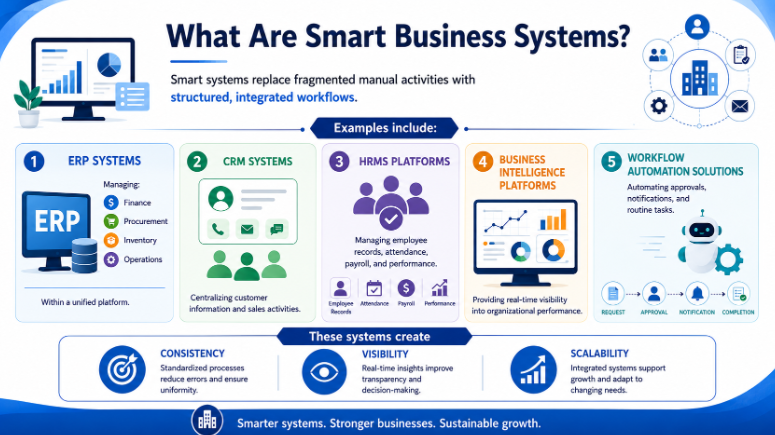
Smart systems replace fragmented manual activities with structured, integrated workflows.
Examples include:
ERP Systems
Managing:
Finance
Procurement
Inventory
Operations
Within a unified platform.
CRM Systems
Centralizing customer information and sales activities.
HRMS Platforms
Managing employee records, attendance, payroll, and performance.
Business Intelligence Platforms
Providing real-time visibility into organizational performance.
Workflow Automation Solutions
Automating approvals, notifications, and routine tasks.
These systems create consistency, visibility, and scalability.
The Benefits of Moving Beyond Spreadsheets
Organizations transitioning to modern business systems typically achieve improvements in several areas.
Improved Efficiency
Automation reduces manual effort and accelerates workflows.
Better Accuracy
Data validation and centralized records reduce errors.
Faster Decision-Making
Real-time reporting improves visibility.
Stronger Collaboration
Departments operate using shared information rather than isolated files.
Improved Customer Experience
Faster processes support better service delivery.
Greater Scalability
Operations can grow without proportional increases in administrative workload.
How to Transition Successfully
Many businesses hesitate because they believe transformation requires replacing everything at once.
This is rarely necessary.
Successful transitions typically follow a phased approach.
Step 1: Assess Current Processes
Identify areas consuming the most time and effort.
Step 2: Prioritize High-Impact Opportunities
Focus on processes creating the greatest operational challenges.
Step 3: Implement Incrementally
Avoid large-scale disruption by modernizing in stages.
Step 4: Train Employees
Ensure users understand both the technology and the benefits.
Step 5: Measure Results
Track improvements in efficiency, accuracy, and business performance.
The Role of Digital Transformation
Moving beyond spreadsheets is often one of the earliest stages of digital transformation.
It creates the foundation for:
Business process automation
Artificial intelligence
Predictive analytics
Cloud adoption
Advanced reporting
Organizations that continue relying heavily on manual processes often struggle to realize the full benefits of these technologies.
Modern systems create the infrastructure required for future innovation.
Key Takeaways
Spreadsheets are valuable tools but are not designed to function as enterprise business systems.
Excessive manual effort, reporting delays, and data inconsistencies are common indicators that an organization has outgrown spreadsheets.
Operational dependencies on specific individuals create significant business risk.
Smart business systems improve efficiency, visibility, accuracy, and scalability.
Integrated platforms eliminate information silos and improve collaboration.
Modern systems support better customer experiences and stronger compliance management.
Digital transformation often begins by replacing fragmented manual processes with structured workflows.
A phased implementation approach reduces risk and improves adoption.
Frequently Asked Questions
Q: Are spreadsheets bad for business?
A: No. Spreadsheets remain valuable tools for analysis and planning. Problems arise when organizations use them as primary operational systems beyond their intended purpose.
Q: How do we know if we've outgrown spreadsheets?
A: Common indicators include reporting delays, increasing errors, version control issues, manual approvals, operational bottlenecks, and growing administrative workloads.
Q: What systems typically replace spreadsheets?
A: ERP platforms, CRM systems, HRMS solutions, workflow automation tools, and business intelligence platforms often replace spreadsheet-driven processes.
Q: Is replacing spreadsheets expensive?
A: Costs vary based on requirements, but many organizations achieve significant ROI through productivity gains, reduced errors, improved visibility, and better scalability.
Q: Should businesses replace all spreadsheets immediately?
A: No. The most successful organizations prioritize high-impact areas and transition gradually rather than attempting a complete replacement at once.
Conclusion
Spreadsheets have helped countless businesses grow.
However, every successful organization eventually reaches a point where manual processes create more problems than they solve.
The warning signs are usually visible:
Increasing administrative effort.
Conflicting information.
Reporting delays.
Operational bottlenecks.
Customer service challenges.
Growth limitations.
Recognizing these signals early allows businesses to modernize before inefficiencies become deeply embedded.
The transition from spreadsheets to smart systems is not simply a technology upgrade.
It is an investment in efficiency, scalability, visibility, and long-term growth.
Softriva has been helping organizations across Saudi Arabia modernize operations, implement business systems, automate workflows, and accelerate digital transformation since 2006.
If you're unsure whether your organization has outgrown its current processes, a structured assessment can help identify opportunities for improvement and prioritize the most impactful next steps.


